
CS-04 · Accounts receivable
Your AR Report Shows What’s Overdue. Does It Show Who to Follow Up With?
A list of overdue invoices tells you where money is outstanding. It does not, by itself, tell you what to do next.
For a finance manager, the difficult handover often comes after the total is agreed. Someone still needs to understand the latest recorded conversation, check a payment promise and decide who should verify the next step. Sorting by balance answers only part of that question.
HYDRADATA’s accounts receivable demonstration connects those two tasks in Power BI: understand the balance, then inspect the records behind a follow-up decision. It uses two report pages and a fixed observation date of 31 December 2025. All amounts are USD.
Portfolio demo | Synthetic data | Not client results
Démonstration de portfolio | Données synthétiques | Aucun résultat client
One report, two different responsibilities
The first page, AR & Aging Overview, is for finance managers and account owners. It shows how much remains outstanding and where overdue balances are concentrated. The second, Collection Action List, is for AR staff, collection colleagues and managers reviewing specific invoices.
These responsibilities overlap, but they are not interchangeable. An account owner manages the customer relationship. The collection owner shown in the invoice detail comes from the selected latest activity. The report keeps those roles separate so a reviewer can ask the appropriate colleague about the recorded follow-up.
The website shows actual r02 report screenshots. They are static images, not an embedded report or a live connection to a customer ledger.
Two actual report views
Static r02 captures. Select an image to enlarge it; open the original for full resolution.
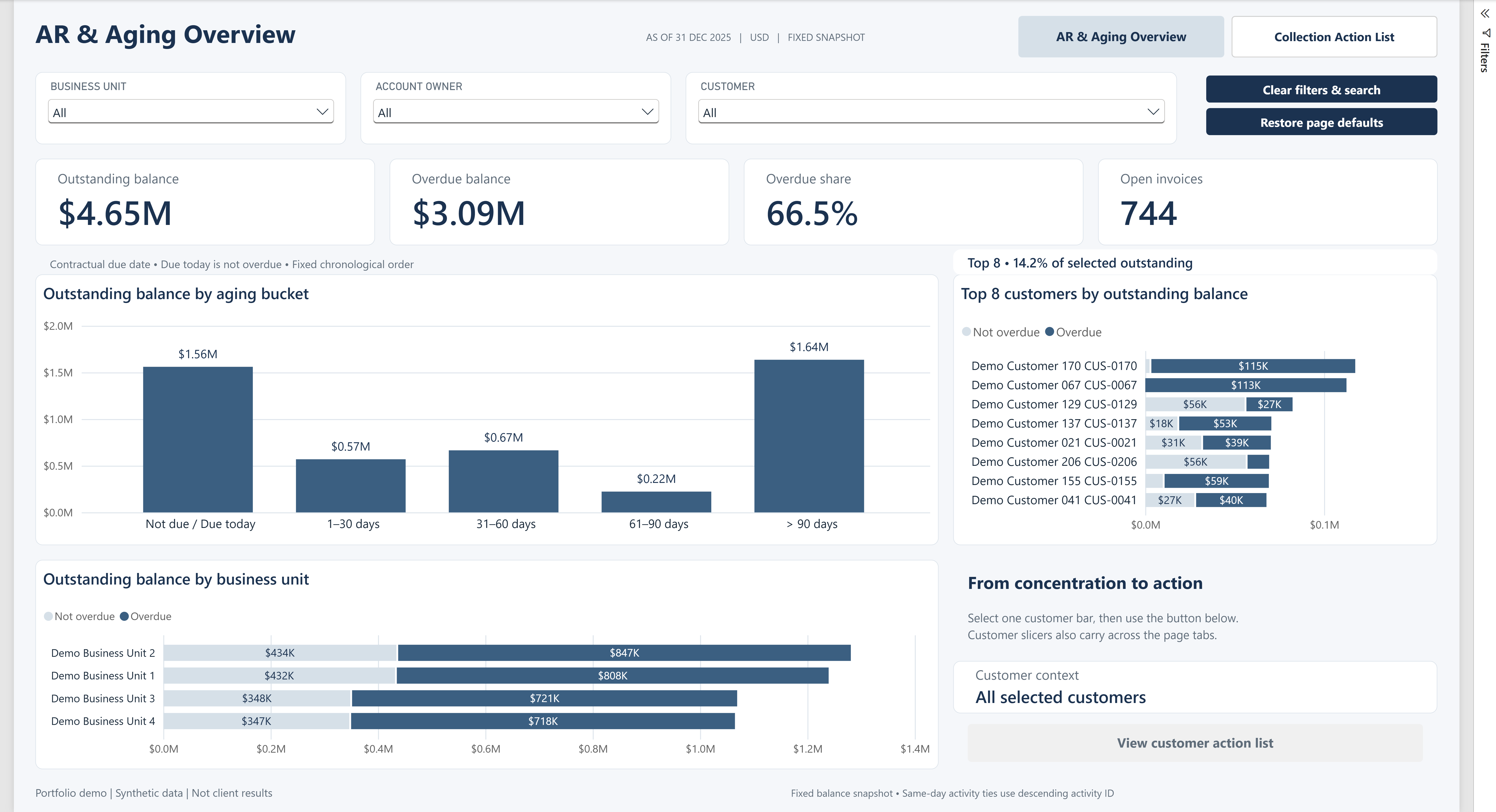
Vue réelle r02, toutes unités, tous responsables de comptes et clients. Instantané au 31 décembre 2025, USD. Cartes arrondies ; le Top 8 est un sous-ensemble.
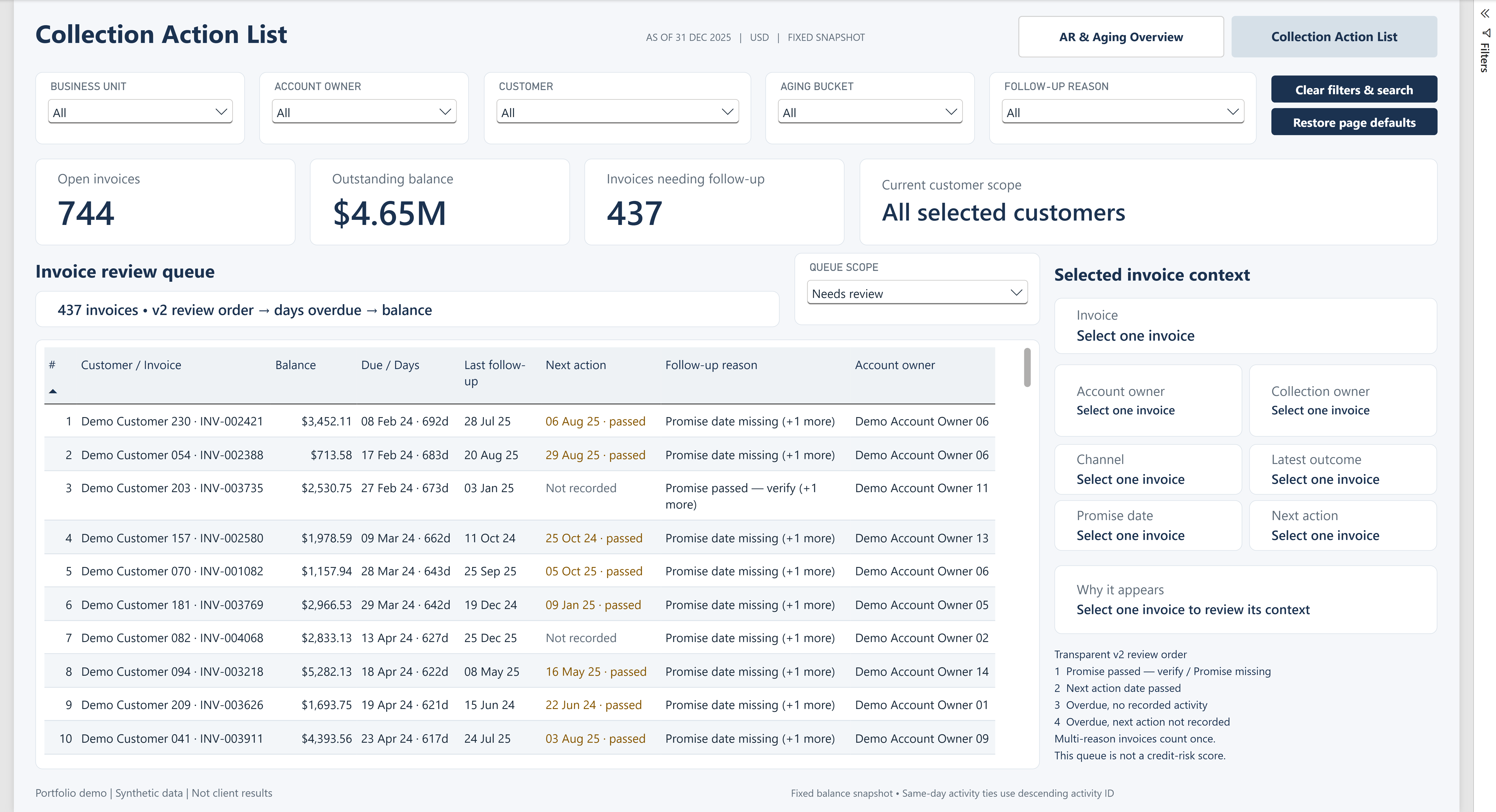
Liste réelle r02, périmètre Needs review par défaut, sans facture sélectionnée. Seules les dix premières lignes sont visibles ; la liste complète compte 437 factures distinctes.
Start with the balance and its date
In the default synthetic snapshot, 744 invoices have a positive remaining balance, totalling $4,654,243.93. Of those, 543 are overdue, representing $3,093,626.95. The overdue share is 66.5% when rounded for display: overdue balance divided by outstanding balance in the same scope.
“Overdue” has a precise meaning here. The contractual due date must be earlier than 31 December 2025. An invoice due on that date is not yet overdue. A partially paid invoice contributes only its remaining balance; settled invoices do not enter the open balance.
Read the aging bars before treating the biggest customer as the whole story. The buckets separate not due or due today, 1–30, 31–60, 61–90 and more than 90 days overdue. Customer and business-unit views then show where those balances sit. The Top 8 customer view is explicitly a subset, with its coverage shown for the selected scope.
Then ask why an invoice needs review
The second page opens on Needs review. Its default queue contains 437 distinct invoices with a combined remaining balance of $2,323,321.28. That is neither the full set of 744 open invoices nor the 543 overdue invoices.
An open invoice enters this queue when at least one defined review reason applies: a current promise date has passed, a current promise has no date, a next-action date has passed, an overdue invoice has no eligible activity recorded, or an overdue invoice with activity has no next-action date recorded.
Promise and next-action checks can apply even when the contractual due date has not passed. Reasons can also overlap. The queue counts each invoice and its balance once; adding the five reason totals would double-count some records.
The displayed order puts promise checks first, followed by passed next-action dates, overdue invoices without recorded activity, and overdue invoices without a recorded next-action date. Within a priority, overdue days, remaining balance and invoice ID determine the order. This is a transparent review convention, not a credit score.
A reading path grounded in the report
Begin with the date, currency and current filters. On page one, compare outstanding and overdue balances, then use the aging distribution to identify a scope worth investigating. In Desktop, selecting a customer bar enables the customer action-list button. Customer slicer selections can also carry across the page tabs.
On page two, check the queue scope before reading the rows. The screenshot shows the first ten visible rows, not all 437 records. Read the reason alongside balance and due date. Select an invoice in the report to see the recorded channel, latest outcome, current promise, next action and the two owner roles.
One visible row illustrates why the reason matters: INV-002421 appears with “Promise date missing (+1 more).” That label identifies incomplete recorded context. It does not establish that the customer broke a dated commitment. The full reason list belongs in the selected-invoice panel; the screenshot’s unselected panel is not evidence of a completed investigation.
For a full reset after searching and drilling through, use Clear filters & search, then Restore page defaults. The first clears selections and search text; the second restores Needs review and the default order. They are separate actions.
Turn a flag into a question
Consider a hypothetical review conversation: an invoice has a Promise to Pay outcome, but no promise date. Calling it a broken promise would introduce a fact the record does not contain. A useful next step is to ask the collection owner whether a date was agreed and recorded elsewhere, then confirm the current position before contacting the customer.
The same discipline applies to “No activity recorded.” It means no eligible activity is available under the report rules, not that nobody ever contacted the customer. The latest eligible activity excludes undated records and dates after the observation date. Same-day ties use activity ID for a consistent selection; that does not prove the order of conversations within a day.
Know what this snapshot cannot tell you
This is one balance snapshot. Without a complete receipt history, it cannot reconstruct arbitrary historical balances or forecast cash receipts. It demonstrates neither automatic collections nor DSO improvement, payment probability or client outcomes.
The r02 development handoff records model reconciliations, a validator result of zero errors and warnings, and save/reopen/refresh checks. Those are technical evidence, not business results. Full screen-reader retesting of the revised layout, comprehensive numerical contrast checks and renewed human acceptance of r02 remain unconfirmed.
For your next AR review, agree the observation date, identify the balance scope, read the reason and verify the latest record before assigning an action. Keep the question and its owner explicit.
Need an AR report that connects balances with reviewable follow-up context? Discuss your reporting question with HYDRADATA.